
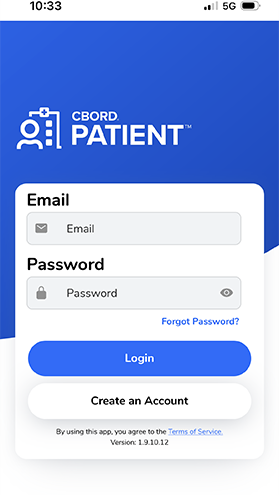
 Download the CBORD Patient App to order meals from your phone or smart device.


Watch the video and/or read the instruction guide [PDF 1689.78 KB].
Frequently asked questions
CBORD Patient is the name of the patient food app used to order meals at QEII Hospital.
Patients staying in QEII Hospital wards will be able to use the CBORD Patient App to order meals - when they want, later this year.
Your family and/or carer can also help place orders for you – from outside the hospital – using the patient app on their smart phone or device.
- It’s easy to use, with clear steps and buttons.
- You can order meals directly from your bedside – no paper menus needed.
- You can choose meals that match your dietary needs.
- You can pick meal times that suit you.
- You can see photos about food items you are ordering.
- You can skip Call Centre phone waiting times.
- Your family and/or carer can place orders for you from outside the hospital.
- Your own phone or smart device.
- The CBORD Patient App installed to create an account with a username and password.
- Date of birth.
- Hospital details given to you when admitted, including your Patient ID (UR/MRN number on your wristband).
- Details about your location:
- Facility ID: Enter the letters qeii
If you don’t have your own phone or if you have a special diet, talk to a nurse to help you find a way to order.
You can see the QEII Hospital Room Service food menu [PDF 853.57 KB] at any time.
Option 1 – Use the CBORD Patient App
This is the fastest way to order your meals from your bedside.
Watch the CBORD Patient App video and/or read the instructions guide [PDF 1689.78 KB] to learn more.
Log in to the patient app.
You can get the app by:
- Scanning the QR code on the menu at the bedside with your phone or smart device, or
- Downloading the CBORD Patient App from the App Store or Google Play.
Once you have the app, you will be asked to:
- Create an account with a username and password
- Provide your:
- Patient ID (UR/MRN number on your wristband)
- Date of birth
- Facility ID: Enter the letters qeii
- A family and/or carer should create an account using their own email address, not the patient's email.
Choose your meals from the menu categories and check your choices before placing your order.
If you don’t have a smart phone, use Option 2 or Option 3 below.
Option 2 – Phone the call centre
You can also order by phone if you do not have a smart device, you do not have your own mobile, have a cultural and religious diet, or you are not sure about some menu items. You can look at the QEII Hospital Room Service food menu [PDF 853.57 KB] before calling.
- From your mobile: 07 3845 7770
- From a hospital phone: ext. 7770
Please tell us your:
- Patient name
- Patient ID (UR/MRN number on your wristband)
- Date of birth
- Facility ID: Enter the letters qeii
We will read out the menu options and place the order for you.
Option 3 – Ask a nurse or nutrition staff
- If you need help to order, ask your nurse.
- If you have a special diet or allergies, nutrition staff can help you choose safe meals.
Meals can also be ordered online without downloading the CBORD Patient App to a smart phone or device. Go to patient.cbord.com and create an account with a username and password.
Enter your date of birth.
Enter hospital details given to you when admitted, including your Patient ID (UR/MRN number on your wristband).
Enter details about your location:
- Facility ID: Enter the letters qeii
You will only be able to order food and drinks on the app or from the call centre for your diet code.
During your hospital stay, you will be given a diet code for your medical needs, special diets, cultural or religious needs and/or allergies. Your medical team may also place you on a special diet.
Please tell your nurse if you have any special diets, cultural or religious needs or allergies.
When you log in to the app, items for your diet code will come up on the screen for you to select. Some items on the main menu (such as the Build Your Own Salads and Sandwiches) as well as some allergies and diet codes cannot be ordered from the app.
You can read about ordering Halal food in these languages:
- Arabic - QEII Halal food ordering [PDF 425.63 KB]
- English - QEII Halal food ordering [PDF 363.93 KB]
- Hazaragi - QEII Halal food ordering [PDF 427.17 KB]
- Malay - QEII Halal food ordering [PDF 331.23 KB]
- Persian - QEII Halal food ordering [PDF 430.07 KB]
- Somali - QEII Halal food ordering [PDF 335.54 KB]
- Urdu - QEII Halal food ordering [PDF 430.96 KB]
Room Service orders take about 45 minutes from the time you order to delivery at your bedside, during the current meal period (All Day Breakfast or Lunch/Dinner).
If you place an order outside the current meal service period, your meal will be prepared and delivered once that meal service period begins. The meal will then arrive about 45 minutes to the bedside.
You can also use the patient app to order food and drinks up to one day in advance.
If you have food allergies, cultural and religious, or special diet needs, please tell a nurse so that you can be placed on the correct diet. The patient app will show safe options for common allergies and some special diets. If you are not sure of menu items, please phone the call centre.
Your personal information entered into the CBORD Patient App is used to help meal ordering only, in accordance with the Information Privacy Act 2009 (Qld) (IP Act).
Frequently asked questions in other languages
You can read the frequently asked questions from this page in the following languages:
- Persian (فارسی) - QEII room service CBORD Patient App frequently asked questions [PDF 425.79 KB]
- Chinese Simplified (简体中文) - QEII room service CBORD Patient App frequently asked questions [PDF 562.06 KB]
- Korean (한국인) - QEII room service CBORD Patient App frequently asked questions [PDF 410.34 KB]
- Serbian (Српски) - QEII room service CBORD Patient App frequently asked questions [PDF 394.96 KB]
- Somali (Af-Soomaali) - QEII room service CBORD Patient App frequently asked questions [PDF 392.84 KB]
- Spanish (Español) - QEII room service CBORD Patient App frequently asked questions [PDF 277.17 KB]
- Vietnamese (Tiếng Việt) - QEII room service CBORD Patient App frequently asked questions [PDF 337.38 KB]